Free Load Takedown Spreadsheet Template
26 March 2026 · 3 min read
Download a free Excel template for structural load takedown calculations: input tributary areas, accumulate loads through levels, and produce permit-ready results.
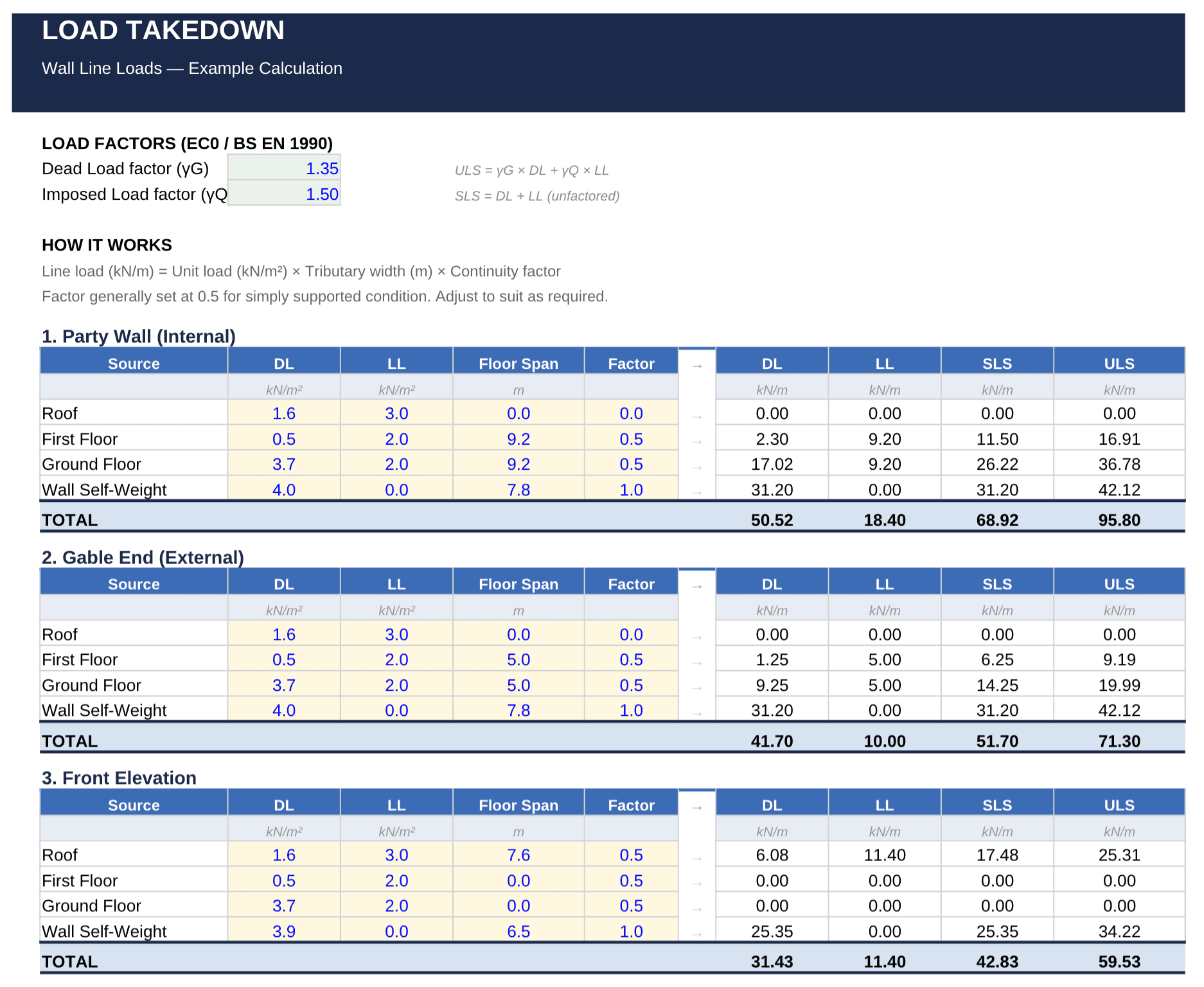
If you've ever done a manual load takedown with pen and paper, you know the process: trace loads from roof to foundations, calculate tributary areas, and accumulate forces at each level. It's straightforward for a single wall — but when you need to repeat that for every support in the building, the repetition adds up fast.
A spreadsheet is the natural next step. It keeps the same transparent, hand-calculation logic while eliminating the tedious arithmetic. We've put together a free Excel template that does exactly that.
What is this spreadsheet?
A load takedown is the process of tracing how gravity loads transfer through a structure — from floors and roofs, into walls and columns, and down to the foundations. If you're new to the concept, our introduction to load takedown covers the basics.
This spreadsheet automates the repetitive parts of that process. You input your floor loads and tributary areas; the template accumulates the loads through each level and gives you total foundation loads at the bottom.
What's included
The template is a single Excel workbook designed for residential and light-commercial projects:
- Input floor loads and tributary areas per element — enter dead and live loads for each floor or roof, along with the loaded width for each supporting wall or column.
- Accumulate loads down through multiple levels — the spreadsheet sums loads from the top of the structure to the foundation, level by level.
- Organised layout ready for permit submission — results are clearly laid out so they can be printed or attached to a submission package.
- Works with any residential or light-commercial project — the template handles multi-storey structures with different floor loads at each level.
How to use it
1. Mark up your floor plan
Before opening the spreadsheet, sketch the span directions and supports on your floor plan — exactly as you would for a manual load takedown. Identify which floors span onto which walls, and note the tributary widths.
2. Enter loads and tributary areas
Open the template and fill in the floor loads (dead + live, in kN/m²) and the tributary width for each support at each level. The spreadsheet calculates the line load to each support automatically.
3. Add wall self-weight
Enter the self-weight for each wall section. The template adds this to the accumulated floor loads to give you the total load at foundation level.
4. Read off the results
The bottom row shows the total foundation line load for each support. These values can be used directly for preliminary foundation design — strip footings, pad foundations, or pile loads.
For a full worked example of this process, see our load takedown worked example, which walks through a two-storey house step by step.
Download the free template
Free load takedown spreadsheet
Download a ready-made Excel template. Enter your email and get instant access.
Get free spreadsheetWhen to move beyond a spreadsheet
A spreadsheet works well for simple, regular structures — the kind where you can identify clear one-way spans and straightforward load paths. But there are situations where you'll outgrow it:
- Complex floor layouts — when spans run in multiple directions or tributary areas overlap, it becomes hard to track in a flat table.
- Frequent revisions — if the architect changes the layout, re-entering everything from scratch is slow and error-prone.
- Visual communication — a spreadsheet doesn't show where the loads are on the plan, making it harder to check and communicate results.
That's exactly why we built LoadTakedown — a lightweight web app that lets you sketch structures directly on your PDF plans, assign loads visually, and get tributary load results instantly. It keeps the transparency of a manual calculation but handles the complexity that a spreadsheet can't.
Sketch your structure straight onto a PDF plan and get tributary loads for every wall and level, instantly.
Open LoadTakedownA spreadsheet is a great step up from pen and paper. When your projects demand more, the app is there to take over.