Save Time on Column Design for Large Structures: From Analysis Model to Column Schedule
26 October 2026 · 8 min read
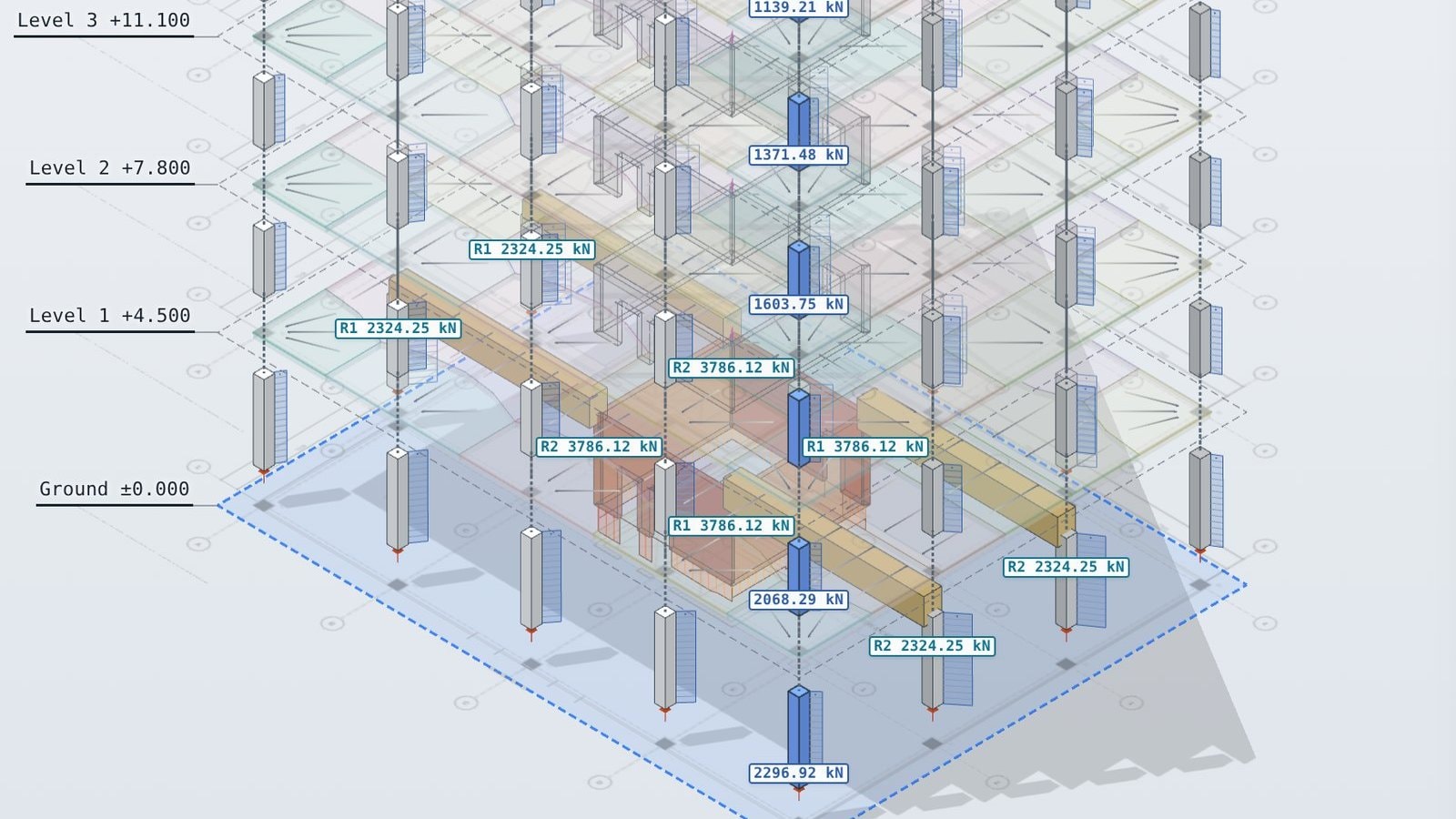
Import ETABS, SAP2000, Robot, Tekla Structural Designer or RFEM results, check them against a tributary column rundown, group columns by load and export a column schedule for Revit.
Column design on a large building takes far longer than the design itself. The loads come from the analysis model, are checked by a hand rundown, compared column by column, grouped, stepped over the height and then typed into a schedule. LoadTakedown joins these steps into one workflow: import the analysis model, run a tributary column rundown beside it, pick the design load for each column, group columns into sections and export the column schedule.
Column design is in early access. See the note at the end of this post.
How is column design usually done on a tall building?
On most multi-storey concrete and steel buildings the process looks like this:
- Analysis model. An ETABS, Robot or similar model gives a set of column forces for every storey and load case.
- Manual column rundown. An engineer builds a tributary area rundown in a spreadsheet to check and rationalise the analysis loads.
- Comparison. The analysis load and the rundown load are compared column by column, level by level, and a design load is chosen.
- Rationalisation. Fifty columns on plan become a handful of section and reinforcement types, stepping down the height as the load grows.
- Column schedule. The result is typed into Excel or marked up on a PDF, then handed to a BIM modeller to rebuild as a schedule in Revit.
Each step is done by hand, often by a different person, and each handover is a chance for a number to be copied wrongly.
Why can't you design columns straight from the analysis model?
The analysis model gives a load and a design for every column at every storey. On a tall building those numbers are not ready to build from, for three reasons.
Construction staging
The model applies the whole building's weight to the finished frame in one step. The real building is built floor by floor, and each floor is cast level before the next goes on. Columns shorten more than walls and cores under load, and in a single-step analysis the stiff cores pick up load that, on site, stays in the columns.
A construction sequence analysis captures this, but it takes time to set up and check, and it is rarely in the fee. Without it, columns next to cores can read lighter than they will be.
Transfers
Where a column stops on a transfer beam or slab, the transfer deflects. In the model, the columns above it shed load sideways through the slabs to stiffer columns nearby, so the transferred column and the transfer itself can look lightly loaded. On site the transfer is often propped while the floors above are built, and when the props come out the load goes back to where the rundown says it is.
A finite element model shares load by stiffness. A rundown shares it by tributary area. Near transfers and cores the two can differ by 20% or more, and neither is the whole answer. The usual practice is to take the worse of the two, column by column.
One design per column is not buildable
Even with the right loads, the analysis model sizes every column for its own load at every storey. A tower with 50 columns over 30 storeys can come back with hundreds of different section and reinforcement combinations.
Site teams need the opposite: a few column types, the same formwork reused floor after floor, and section changes at a small number of storeys. Columns with similar loads are grouped into one type and designed for the worst in the group. Sections step down only where the load drop is worth a change of formwork, and never get bigger going up. That rationalisation is engineering judgement, and today it is done by hand in a spreadsheet.
What does LoadTakedown do with an analysis model?
Import the model
LoadTakedown reads the analysis model and its results. It builds a load takedown model with one level per storey, and brings in:
- columns and walls at their sizes and positions
- slab outlines and thicknesses
- area loads from the model, if you want them, or your own loads set in LoadTakedown
- the column forces from the analysis, by storey and load case
Each column is matched to its column in the analysis model by position on every storey, so a column that is renumbered between floors is still followed down the building. Columns are labelled by grid, such as B/3, so the comparison reads the same as the drawings.
Run the column rundown
LoadTakedown then works out the tributary area of every column on every floor, and runs the loads down to the foundations. Transfers are followed through the beams, slabs or walls that carry them. Every number can be traced back to the floor area and load it came from.
Compare the two, column by column
The comparison table lists every column at every storey with both loads side by side.
| Column | Storey | Analysis model (kN) | Rundown (kN) | Difference | Design load (kN) |
|---|---|---|---|---|---|
| B/3 | Level 8 | 1,840 | 1,910 | +4% | 1,910 |
| B/3 | Level 4 | 3,320 | 3,460 | +4% | 3,460 |
| B/3 | Level 1 | 4,210 | 5,080 | +21% | 5,080 |
| C/3 | Level 1 | 4,960 | 4,720 | −5% | 4,960 |
Illustrative values.
Large differences are flagged, so attention goes to the columns that need it, usually those near transfers and cores. For each column you choose the analysis load, the rundown load or the envelope of both. The envelope is the default.
Designing columns on a tower? Book a demo and we will run your analysis model through the column workflow.
Book a demoGroup columns by load
Design loads are shown on plan and in 3D, coloured by load range. Select the columns that should share a design, set the load range, and assign a section and reinforcement to the group. A column type can change at any storey, so a column can step from 600 × 600 at the base to 400 × 400 at the top, with the step placed where the load allows it.
Columns that sit just above a group's range are flagged, so you can decide whether to move them up a type or leave the grouping as it is.
Export the column schedule
The column schedule shows every column over the full height of the building, with its section and reinforcement at each storey.
| Storey | C1–C6 | C7–C12 | C13–C16 |
|---|---|---|---|
| Level 9 to Roof | 400 × 400, 4 × 16 mm | 400 × 400, 4 × 16 mm | 450 × 450, 8 × 20 mm |
| Level 5 to Level 8 | 450 × 450, 8 × 20 mm | 450 × 450, 8 × 20 mm | 500 × 500, 8 × 25 mm |
| Ground to Level 4 | 500 × 500, 8 × 25 mm | 600 × 600, 12 × 25 mm | 600 × 600, 12 × 32 mm |
Illustrative values.
The schedule exports to Excel and as IFC, with the column type, section, reinforcement and design load on each column, ready for the BIM modeller to bring into Revit. There is no PDF markup to read and nothing to retype. When the loads change, update the model, check the comparison again and export a new schedule.
Which structural software does it work with?
The workflow reads results from the analysis packages used on most large buildings.
| Software | Vendor | Typical route in |
|---|---|---|
| ETABS | CSI | Model text file (.e2k) and database tables |
| SAP2000 | CSI | Model text file (.s2k) and database tables |
| SAFE | CSI | Model text file (.f2k) and column reactions, for transfer and podium slabs |
| Robot Structural Analysis | Autodesk | Result tables and model |
| Revit | Autodesk | IFC model in, column schedule out |
| Tekla Structural Designer | Trimble | Result tables and model |
| RAM Structural System | Bentley | Result tables and model |
| STAAD.Pro | Bentley | Input file (.std) and result tables |
| RFEM and RSTAB | Dlubal | Result tables and model |
| MIDAS Gen | MIDAS | Model text file (.mgt) and result tables |
| SCIA Engineer | Nemetschek | Result tables and model |
| Oasys GSA | Oasys | Model text file (.gwa) and result tables |
| ProtaStructure | Prota | Result tables and model |
| CYPECAD | CYPE | Result tables and model |
Any package that exports column forces by storey and load case as a spreadsheet can be read, and any BIM model can come in as IFC. If your package is not listed, get in touch.
What stays with the engineer?
The workflow brings the numbers together. The decisions stay with the engineer:
- which load to design to where the two methods disagree
- how the building is built and how transfers are propped
- how many column types the project can carry, and where they step
- the section and reinforcement design itself, to your design code
LoadTakedown is a gravity load takedown. Lateral loads and second-order effects come from the analysis model, and the design of each column type is checked to your design code in your usual design software.
How much time does it save?
On a typical tower, the rundown, the comparison and the schedule are each a separate spreadsheet, rebuilt every time the architecture changes. Joining them means one model, one comparison and one export. The hours go into the decisions rather than the data entry, and when the loads change the schedule follows in minutes rather than days.
FAQ
Does this replace ETABS or my analysis software?
No. The analysis model is still the source for lateral design, frame actions and the overall behaviour of the building. LoadTakedown sits beside it as the gravity rundown and the place where column loads are compared, grouped and scheduled.
Can I set the loads in LoadTakedown instead of importing them?
Yes. You can import area loads from the analysis model, or set dead, superimposed and imposed loads per floor area in LoadTakedown.
Does it work for steel columns?
Yes. A column type can be a steel section instead of a concrete section with reinforcement, and the schedule lists the section at each storey.
Which design codes does it use?
The rundown and the comparison are code-neutral. Load factors and combinations follow the region set for the project. The section and reinforcement design is checked by the engineer in their own design software.
Column design import, comparison and scheduling are in final testing and not yet available to all users. Book a demo to get early access. Default values in the app are typical; check them, and the results, with a competent engineer before use in design.